Page Creation
Establish your digital presence. Learn how to create and configure a custom page to connect with your audience.
Creating a New Page
To start building your community or business presence, navigate to the Custom Page section in the sidebar and select Page Creation. You will be guided through a simple setup process.
Key Information Fields
Page Name
Choose a unique and recognizable name for your page. This is how users will identify you.
Category
Select a category (e.g., Business, Community, Public Figure) to help users find your page.
Description
Write a short bio or summary of what your page is about. Keep it concise and engaging.
Cover Photo
Upload a high-quality cover image (1200x300px recommended) to make your page visualy appealing.
Tags
Add relevant keywords to improve discoverability in search results.
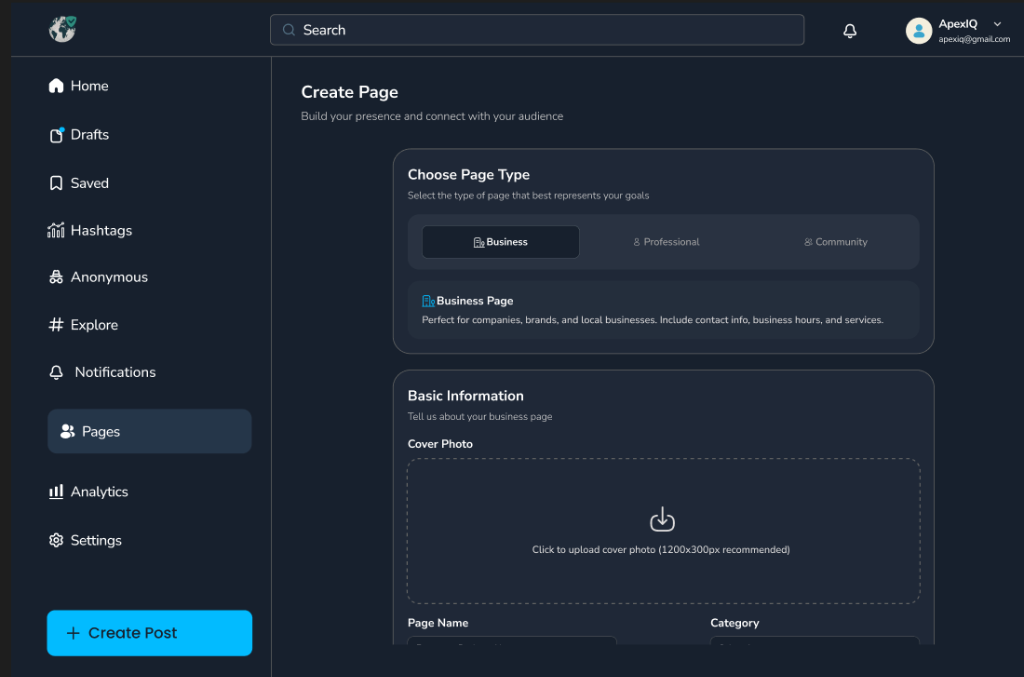
The Page Creation interface provides a streamlined form to set up your entity quickly.
Contact & Location
Providing accurate contact information is crucial for credibility. These fields help your audience connect with you directly.